Recently, I had a requirement in one of my projects to break apart a list of items inside of one element. Each item was separated by a comma and would need to be placed into its own element. For instance within an element I may have a list of employees with each one separated by a comma:
9123456,9123455,9123444,9123456So after looking around the net to see if someone else has had to deal with this challenge, a colleague forwarded on this
link to me by Michael J. Williams. The context of this link was pure XSLT with nothing BizTalk related in it.
So I figured that I would create a post that would show you how you can do something similiar, but how you would accomplish this inside of BizTalk.
So to further illustrate what my inbound message looks like, here is an example:

For both VEHICLE_LIST and EMPLOYEE_LIST I am expecting a list of values separated by commas within one element.
However, the destination system is expecting them in their own element as shown below:
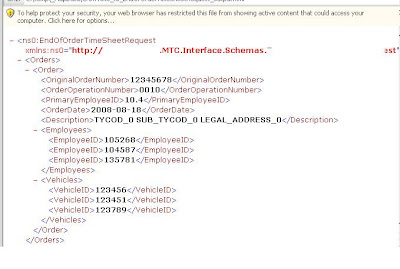 So inorder to solve this problem I am going to use a standard BizTalk Map and use the scripting functoid.

Within the Scripting Functoid I am going to call an "Inline XSLT Template".

The XSLT requires two parameters:
- The list of Employees( or Vehicles)
- A delimiter character - in my example I am using a comma ','

Here is the code listing that I have used and is based upon Michael's post. I have made a few modifications including:
- Removing his inititial template. In his example he had one template calling another. In my example, it is the scripting functoid that is initating the XSLT call and the parameters come from the Functoid input parameters.
- Included the tags to reflect my requirements.
- Provide a check to deal with a comma being included in the list but no value is included.
<xsl:template name="output-Employees">
      <xsl:param name="list" />
      <xsl:param name="delimiter" />
      <xsl:variable name="newlist">
        <xsl:choose>
          <xsl:when test="contains($list, $delimiter)">
            <xsl:value-of select="normalize-space($list)" />
          </xsl:when>
          <xsl:otherwise>
            <xsl:value-of select="concat(normalize-space($list), $delimiter)" />
          </xsl:otherwise>
        </xsl:choose>
      </xsl:variable>
      <xsl:variable name="first" select="substring-before($newlist, $delimiter)" />
      <xsl:variable name="remaining" select="substring-after($newlist, $delimiter)" />
       <xsl:if test ="string-length($first) != 0">
      <EmployeeID>
        <xsl:value-of select="$first" />
      </EmployeeID>
      </xsl:if>
      <xsl:if test="$remaining">
        <xsl:call-template name="output-Employees">
          <xsl:with-param name="list" select="$remaining" />
          <xsl:with-param name="delimiter">
            <xsl:value-of select="$delimiter" />
          </xsl:with-param>
        </xsl:call-template>
      </xsl:if>
    </xsl:template>


 The issue is that if the element doesn't exists, then BizTalk will generate the following exception(truncated for readability):
 The checks come in the form of Logical Existence and Value Mapping functoids. The Logical Existence functoid will return "True" or "False" based upon whether or not the element/attribute that you connect it to exists. You then use this output to feed the Value Mapping functoid. The Value Mapping functoid requires two inputs:


