Sunday, August 24, 2008

BizTalk Mapper: Transforming Comma Delimited List into Elements

Recently, I had a requirement in one of my projects to break apart a list of items inside of one element. Each item was separated by a comma and would need to be placed into its own element. For instance within an element I may have a list of employees with each one separated by a comma: 9123456,9123455,9123444,9123456

So after looking around the net to see if someone else has had to deal with this challenge, a colleague forwarded on this link to me by Michael J. Williams. The context of this link was pure XSLT with nothing BizTalk related in it.

So I figured that I would create a post that would show you how you can do something similiar, but how you would accomplish this inside of BizTalk.

So to further illustrate what my inbound message looks like, here is an example:


For both VEHICLE_LIST and EMPLOYEE_LIST I am expecting a list of values separated by commas within one element.

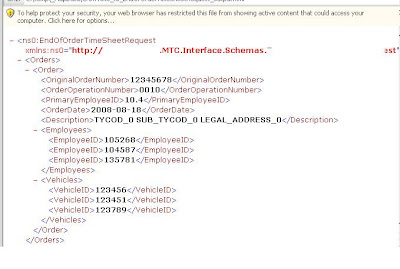
However, the destination system is expecting them in their own element as shown below:

So inorder to solve this problem I am going to use a standard BizTalk Map and use the scripting functoid.

Within the Scripting Functoid I am going to call an "Inline XSLT Template".


The XSLT requires two parameters:

  1. The list of Employees( or Vehicles)

  2. A delimiter character - in my example I am using a comma ','


Here is the code listing that I have used and is based upon Michael's post. I have made a few modifications including:
  • Removing his inititial template. In his example he had one template calling another. In my example, it is the scripting functoid that is initating the XSLT call and the parameters come from the Functoid input parameters.
  • Included the tags to reflect my requirements.
  • Provide a check to deal with a comma being included in the list but no value is included.


<xsl:template name="output-Employees">
<xsl:param name="list" />
<xsl:param name="delimiter" />
<xsl:variable name="newlist">
<xsl:choose>
<xsl:when test="contains($list, $delimiter)">
<xsl:value-of select="normalize-space($list)" />
</xsl:when>
<xsl:otherwise>
<xsl:value-of select="concat(normalize-space($list), $delimiter)" />
</xsl:otherwise>
</xsl:choose>
</xsl:variable>
<xsl:variable name="first" select="substring-before($newlist, $delimiter)" />
<xsl:variable name="remaining" select="substring-after($newlist, $delimiter)" />
<xsl:if test ="string-length($first) != 0">
<EmployeeID>
<xsl:value-of select="$first" />
</EmployeeID>
</xsl:if>
<xsl:if test="$remaining">
<xsl:call-template name="output-Employees">
<xsl:with-param name="list" select="$remaining" />
<xsl:with-param name="delimiter">
<xsl:value-of select="$delimiter" />
</xsl:with-param>
</xsl:call-template>
</xsl:if>
</xsl:template>

Saturday, July 26, 2008

Considerations for supporting multi-node BizTalk Groups

I recently responded to a question in a forum regarding application availability during planned and unplanned outages.

  • When it comes to Windows Patching, you will need to co-ordinate your reboots with whomever is responsible for this task. You do not want both SQL Nodes down at the same time nor do you want all of your BizTalk app servers down at the same time either. Your infrastructure team may not understand all of the dependencies so it is important to lay out a plan for them.

  • If you use MOM/System Centre for monitoring your BizTalk environment, place your servers into maintanence mode while your reboots are occurring. Otherwise you will receive a lot of 'spam' indicating that Host Instance 'abc' on server 'xyz' has been terminated only to receive another indicating that it has initialized successfully. Even better if you can script placing your servers into Maintanence mode. This will ensure all servers are brought into this mode consistently and quickly. Also recognize that this may leave you vulnerable as you will not have the MOM coverage that you usually do during that period. This is a bit of a double edge sword. You want your ops teams to rely and trust your MOM alerts, so you do not want to overwhelm them with false alerts. On the other hand, if your BizTalk environment is processing messages while in Maintanence mode, you will not have the coverage that you do during standard operating windows.

  • We have experienced some odd Host Instances shutting down behaviour when our Domain Controllers are rebooted. So be aware of this...there is a hot fix available.

  • It is important to understand your patches/software updates. I have experienced this the hard way :-(. All BizTalk servers were suppose to receive a file adapter patch. One server did not receive the update. We then had an intermittant problem that the patch should have fixed. After further investigation we discovered the server was missed. To determine which patches have been applied to a server, you can see this information in your Control Panel. Saravana Kumar has a post with more detailed instructions.

  • Regarding updating one server while you work on another, you may run into situations like updating an adapter where you are also updating the BizTalkMgmtDb. This could cause conflicts with your 'live' servers. So in general I will work on one node while the others pick up the remaining workload, but once again understand the implications of the update you are applying.

  • If you cannot take your application offline long enough to deploy a new version of an application, you will want to look at side by side versioning. While my shop is 24x7, we can usually negotiate a small outage window to perform an update. However, I can see some Financial/Health/Manufacturing environments where this is not feasible

  • When configuring your Hosts/Host Instances, think about the dependencies that you may introduce if applications share host instances. For many applications, it is not acceptable to take it offline so that you can update a totally unrelated application. I am not saying that you should not share Hosts/Host Instances, but just be aware of the dependencies that you may be creating

Sunday, June 29, 2008

SOA: Conference Summary and Random Thoughts

I recently attended a SOA and Application integration conference. The conference itself was technology agnostic, but Microsoft did have a presence, along with several other vendors. I have decided to publish some of the notes that I took over the course of the conference. I figure that they may be worth looking back on as SOA continues to evolve. Hopefully they may help out some other readers as well.

Disclaimer: The thoughts described are not necessarily my original thoughts. Where possible, I will try to give credit to the original 'author' however in some cases I may not necessarily have all of this info. I have also done my best to take these notes in the context that they were presented in.

Themes/Ad hoc notes:

  • Desire to react to change is greater than the need for the application to last several years. No longer are companies expecting their applications to last "for ever". Gone are the days were people will build systems to last 10 - 15 years. Now systems need to be flexible so that when business needs change, IT can react in a timely manner. - Massimo Pezzini

  • If a definition/summary of a Service cannot be understood by both a Business person and someone from IT, then it is not a SOA service. - Massimo Pezzini

  • Business Activity Monitoring (generic, not specific to Microsoft BAM) is the single biggest near-team opportunity for IT to shine. - Massimo Pezzini

  • Now that Web Services are fairly mainstream, do we still need integration? Yes, Web Services only solve the communication problem. They still do not address other characteristics of SOA: Business Activity Monitoring, Extreme Transaction Processing, Complex Event Processing, Centralized Business Rules, Modeling. - Massimo Pezzini

  • An organization needs to establish a SOA Centre of Excellence (COE) in order to be successful in delivering a SOA. Someone, or group, needs to own the process. Without this direct accountability, the project is bound to fail. - Hans C. Arents

  • SOA is more than an architecture, it is an approach to developing software. - Hans C. Arents

  • Introduce SOA in a stepwise manner. - Hans C. Arents

  • When 'pitching' SOA, you need to provide actual numeric(empirical) measurements. You cannot look for project sponsorship without providing empirical data on the benefits of SOA. You cannot say it will improve reliability or improve efficiency. You need to associate real values to your claim(s). The drivers do not necessarily directly relate to dollars, but need to be measurable. - Frank Kenney

  • Integration is inevitable in today's market. However, the decision needs to be made as to whether it will be piecemeal or systematic. Piecemeal refers to point - to - point integration like file based FTP integration. Systematic refers to a level of abstraction and loosely coupled interfaces like an ESB or Broker. - Frank Kenney

  • Using Web Services, in a point to point manner, is not SOA. It is essentially the same as using FILE based point to point integration. The difference is only how you communicate. You still need middleware to ensure you have loosely coupled systems. - Mark Driver

  • Some companies may decide to go the piecemeal route as it may be "easy" or it is "the way it always has been done". A decision maker also needs to think about what are the costs, or lost opportunities, of not doing integration. - Frank Kenney

  • Systems that are "built to change" are more valuable than systems that are built to last. - Frank Kenney

  • The best integration systems are built to change, adapt and control change. - Frank Kenney

  • SOA is not solely for IT. In fact if SOA is an IT initiative, then you are bound to under deliver to your business units - several authors

  • You need "buy in" from both IT and the Business to be successful.

  • Some topics that I need to spend more time researching, but were continually being discussed within an SOA context are: Event Driven Architectures and Extreme Transaction Processing

Random Thoughts

  • During many of the sessions, "selling" SOA to the business was a popular topic. I think nearly every presenter brought up the value of reusable code as a key driver to adopting SOA. On the surface, I think this point is valid. But, I don't think that it is a statement that can be applied universally. Thinking back to some of the organizations that I have worked for/with, I can see opportunities where this is true. One organization, use to store customer information in 7 different places. Having an address being consistent across these systems was practically a miracle. This case is obviously a good candidate for a common service. Then there are other organizations that have used 3rd party COTS(Commercial Off the Shelf) applications. Presumably, selling the reusable code argument is not as convincing in this type of scenario if the COTS product has not duplicated functionality through out the application.

  • There are a lot of politics in rolling out SOA. People tend to work in silos and tend to be protective of their domains. Programmers also tend to not trust the work of others. When writing code, ego can play a role in programmers being objective; "I can write that [functionmoduleservice] better than that guy". Getting buy in from all of the various groups (silo owners) may be difficult.

  • Whether people like it or not, SOA is coming to an organization near you in the next 2-5 years. Vendors like SAP, Oracle and Microsoft are continuing to release products that leverage SOA. With this said, it is better to understand SOA and plan for it than to try and fight or resist.

  • Having visited some of the other vendor booths that compete in the SOA/ESB/BPM space, I was impressed by some of the vendors offerings. Comparing their capabilities to Microsoft's did validate some of the features that BizTalk enthusiasts have been asking for. More specifically, Modelling and Low Latency messaging were areas that some of the other vendors did impress me with. The good news is that both of these areas are being addressed in OSLO.

  • All in all, I do think that SOA is a step in the right direction. However, every organization is unique and you need to produce a business plan that justifies the implementation of SOA. SOA is invasive and can lead to massive failure if it is done for the wrong reasons. SOA is definitely more than just an IT initiative. If you treat like it is just an IT project, then you are bound to fail, or at a minimum, under deliver.

Thursday, May 22, 2008

BizTalk Hotrod Issue 4 is available

As the title indicates, the latest publication is available for download here. The topics in this issue covered are:

  • BizTalk Exception Management
  • Exposing Business Rules Engine Policies as WCF Services
  • Tools of the Trade
  • Parallel Convoys in BizTalk
  • A Glimpse of the BizTalk Server 2006 R2 WCF Adapters
  • Smart Use of XSLT BizTalk
  • In the beginning
  • What's Under that Hood?

I am still working my way through this edition, but the BizTalk Exception Management Application is a great article. It walks you through an enterprise BizTalk Exception Management application based upon the Patterns and Practices ESB Exception Managment Framework. If you have ever thought about using the ESB Exception Management Framework, this article serves as a great primer.

Friday, May 9, 2008

Calgary .Net User Group Presentation from May 8, 2008

I had the opportunity to present at the Calgary .Net User group. The presentation served as an introduction to BizTalk Server 2006 R2 and highlighted some scenarios in which you would use BizTalk Server.


Sunday, May 4, 2008

PAL is my new pal!!

You are probably thinking huh? The PAL that I am talking about is a tool called Performance Analysis of Logs. Using Performance Counters, PAL will evaluate the collection of Performance Counters against pre-defined thresholds set forth by the applicable Microsoft Product Teams.

PAL is a free tool, which is available on codeplex . I was first introduced to the tool at a Microsoft Premiere Support Workshop put on by Clint Huffman. Admittedly, I am not a Performance Counter expert, quite frankly they can be a little daunting at times as there are so many counters that ship out of the box. But, at some point a person needs to turn to Performance Counters to identify that bottleneck, contention or IO problem.

I had previously run the PAL tool on my system(in a healthy state) just to get a feel for how the tool worked and what kind of report I could expect. Recently, I had the "opportunity" to run the tool in Production. We just came out of our regular Windows Patching Cycle. Our multi-node BizTalk group and SQL Cluster were all patched and rebooted. Shortly after that we started to see errors in the Event Viewers indicating that SSODB could not be reached like below:
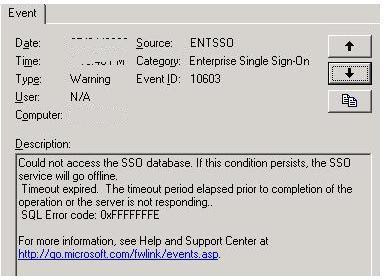
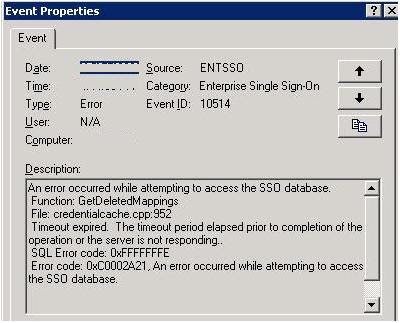

So as a BizTalk resource(Developer/Architect/IT Pro) you never want to see SSO problems in production. Without the Enterprise Single Sign On Service and dependent SSODB (database) your BizTalk applications will grind to a halt. The behaviour that we experienced was that our Host Instances were bouncing like a Yo-Yo. So based on this we knew that the problem was intermittent. We were never completely offline as we did have multiple sets of Host Instances configured, but when you see Host Instances bouncing you are really hoping that BizTalk's Guaranteed Delivery features are as advertised.

So there were many thoughts running through my head as I was really hoping to avoid any downtime. We do have some 24 x 7 systems, so when you go offline for even 5 minutes, you will be exposed. So I started thinking about what could potentially cause this issue, was it the Windows Patching? The Network? Was another set of databases running on the other side of the database cluster causing contention on the SAN? Was this limited to 1 BizTalk Server or were all having connection problems?

I was able to determine that all BizTalk App servers were having problems with connections and yes the problems were intermittent. So this had me thinking it was probably something on the SQL Cluster...but once again where to start? I did follow up with our Windows Server team to see what was patched, they provided me with the list of patches installed. Nothing in that list seemed even plausible. So at this point, I did not really want to start 'guessing' or blindly poking around for a possible solution. I then thought about my good friend "PAL". I figured that if nothing else it would help me narrow down the scope of the problem and give some areas to further investigate.

After seeking the necessary approval to enable Performance Counters on the SQL Cluster, I promptly opened up the PAL tool.

The first thing that I did was change the "Threshold File Title" pull down to select "Microsoft BizTalk Server 2006". This would allow me to have all of the BizTalk counters being accounted for in my logs. Also note that the BizTalk profile contains the relevant SQL Server counters as well.

When you click on the "Export" button, an HTML file will be generated that will include your Performance Counter configuration.
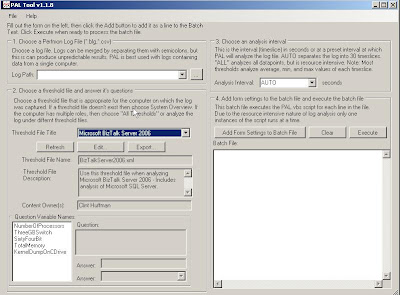

Once you have your HTML file, you will want to copy that file over to the server that is under duress. Once you have copied that file you will want to open up "PerfMon". You can do this by typing PerfMon from a command prompt or from the Run option(under start menu).

Once you are in PerfMon, you will want to right mouse click on "Counter Logs" and select "New Log Settings From". You then browse to the location where you copied your Exported "HTML" file
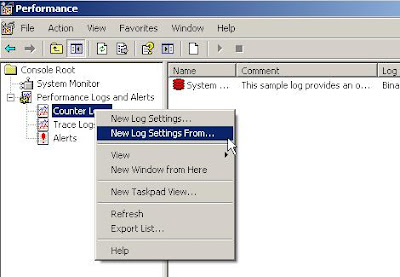

You will then be presented with a dialog box where you can add or remove any counters that are relevant/irrelevant. Complete the dialog box and you will see your new set of counters configured and ready to be captured. You can enable the counters, by right mouse clicking on your new counter set and select "start".
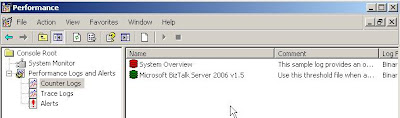

You will need to leave these counters enabled for long enough to get a decent sample of data. If your intermittent problem occurs once ever few hours then you are going to want to get a few intervals in order to get some decent data. Systems rarely run at peak demand all of the time, there are usually some regular "peaks and valleys", so you will want to take this into account when running PerfMon. Also be aware of the amount of disk space you have available for where your Performance Log will be written. This will also depend on how long your test will run.

Once you have collected enough data, stop your Perf test by right mouse clicking on your counter set and select "Stop".

From what I have been told, running PerfMon will not degrade the performance of your system significantly. However, it is advisable to copy your Perf log off of the problematic system and on to your PC or appropriate or server for the next steps.
  1. So go back into the PAL GUI, and in step # 1 "Choose a PerfMon Log File", browse to the file that you just copied from your problematic server.

  2. In step number 2, answer the questions at the bottom left hand corner. The tool wants some further information about your configuration so that the analysis can take these variables into account.

  3. Choose the appropriate Analysis interval. For my situation, I went with "AUTO". This breaks the log down into 30 time slices which was suitable for my situation.

  4. You then want to click the "Add Form Settings to Batch File", A command will then be displayed that will want to execute by clicking on the "Execute" button.

  5. A command window will open up that will execute that Analysis script. When this finishes, an HTML based report will be displayed with a report including the "Red/Green/Yellow" show and charts.
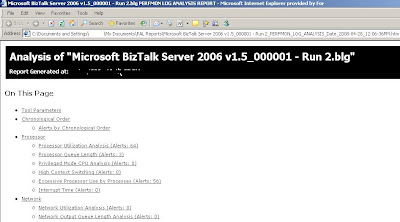

PAL will analyze a ton of data, it has great coverage. Everything is laid out in a logical fashion and since Clint is comparing your data captured against the thresholds deemed "safe/unsafe" by the product teams, you can be confident that the information being presented is applicable.

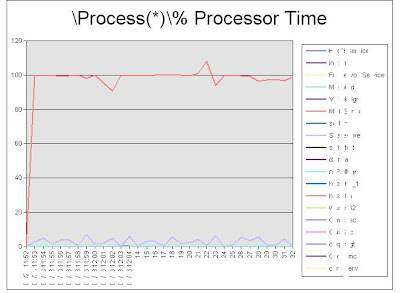
So what ended up being my problem? It was a non BizTalk, non SQL Server related service whose name shall be withheld to protect the "Guilty". The service had spiked, caused the CPU to spike and was creating CPU contention.

Here is the chart that helped me to identify the service, to resolve the immediate issue we restarted the service and notified the appropriate support group for further investigation.

Note: I have 'whited out' the names of the services in the picture below to protect the guilty service. The images that PAL generates are very clean.

So if you are Performance Counter guru, this tool can still help you out and provide a great summary of the information collected. The report generated provides you with some empirical data that can be used for Triage or to support some of your Change Management requirements.

If you are new to Performance Counters, not only does it take a lot of the guess work out of troubleshooting, Clint has provided information and links that allow you to learn about the various Counters and what they mean.

So as you can see the PAL tool is great and definitely needs to be a part of every Microsoft Developer/IT's Pro's tool kit.

Sunday, April 20, 2008

FtpWebRequest Class: Creating Remote Directories


So a question that you are probably asking yourself is, if BizTalk 2006 Rx has a FTP adapter that ships out of the box, why am I concerning myself with this .Net Class? The reason why I am concerning myself with this is that if you need to ensure that a remote folder exists, before you write the file, you can use this class to execute FTP commands against a remote system.

My Requirements

I need to connect to a Unix file system and deliver 3 files: a "work" file, a "sig" file and an "archive" file. So if you had a static file structure, this is not a difficult feat. My issue is that the archive file needs to be placed in the current day's directory. The directory structure that I need to deliver to is /arch/yyyy/mm/dd.

The way the class behaves is that I cannot just assume that the parent folder exists. If I try to determine if 2008/01 exists, I will get an exception, but I won't be able to determine which folder does not exist. So based upon this, I need to ensure that the correct Year folder exists, then month and then day.

Solution Options

  1. Write a Unix script that is included in a Crontab job that routinely checks for missing folders, when a missing folder is encountered, the script creates it.

  2. As part of the BizTalk process, for each file that is about to be written, use the FtpWebRequest Class to check to see if the folder(s) exist. If they do not, then create them as required.

  3. Much like Option #2, have BizTalk create the folder structures, but create a routine that runs once a day and creates folders out several days in advance.

  4. Manually create the folders and "assume" they exist.

Solution Chosen

I chose Option #3 for a few reasons:

  1. I come from a .Net background and am not all that anxious to get my hands dirty writing Unix scripts.

  2. While Option #2, would work it would create unnessary connections to the Unix System during every archive file write. It wouldn't kill the performance, but is not ideal.

  3. Option #3 runs once a day and I can schedule it so that it runs during off-peak load. I can use MOM to notify me of any exceptions that occur and use the SMTP adapter to send me a summary of the folders that were created successfully.

So what is the big fuss?

During the development of the solution, I ran into some interessing quirks about the FtpWebRequest Class. There is not a lot of documentation on it and there seems to be ample problems with it on the forums.

So to start with, familiarize your self with the MSDN documentation: http://msdn2.microsoft.com/en-us/library/system.net.ftpwebrequest.aspx

FtpWebRequest Class Behaviour

  1. If you try to execute a directory listing on an empty folder, a
    System.Net.WebException will be raised. For instance if a person is looking for all folders in a directory called /2008 and there are no child folders in this folder, an exception will be raised. I find this behaviour to be extremely odd and I think this creats a lot of confusion for developers.

  2. I have not found a way to 'defensively' code against scenario #1. The only way that I have been able to deal with this situation is to catch the exception and then create the new folder. I do realize that it is not best practice to use exception handlers as a way to deal with logic, but in this class I did not find a way around it.

  3. If child folders to exist in the directory being listed, a stream is returned which can easily be assigned to a string. You then need to search the string to see if the folder already exists. Also note that in this list, you will find Carriage Return/Line Feed characters which are represented as \r\n

  4. If your FTP Server has different file mounts and you need to navigate up the tree, you can use '%2E%2E' which is the equivalent of '..' So for instance when I log into my FTP server, I get logged into /home/'username'. The path to my archive directory is /'company'/'environment'/interfaces/'interface'/inbound/arch/ . So before I check to see if the archive folder exists, I want to go up two directories, before I navigate to it. '/home' is a sibling folder of '/company' The way this looks in code is:
    string ftpURI = "ftp://" + server + "/%2E%2E/%2E%2E" + path;

The Code

So my purpose for this code is to see if a target directory exists, if it does not exist, I want to create it. To simplify the code, I have removed determining if the Month and Day exist, but the concept remains the same. Ultimately, the return string is my entire archive path: /yyyy/MM/dd . If I encounter an exception that is unexpected ( something other than a System.Web.Exception) I throw an exception back to the caller.

Here is some sample code that can be called from .Net or BizTalk if you put it into a Serializable attributed class:


public string CreateNewUnixArchiveFolder(string path, string server, string username, string password, string currentYear, string currentMonth, string currentDay)

{

string tmpStr = "";

FtpWebResponse FTPResp;
FtpWebRequest request;
Stream ftpRespStream;
StreamReader sr;
string folderList;
string ftpURI = "ftp://" + server + "/%2E%2E/%2E%2E" + path;
tmpStr = currentYear + currentMonth + currentDay;

try
{
request = (FtpWebRequest)WebRequest.Create(ftpURI);
request.KeepAlive = false;
request.Method = WebRequestMethods.Ftp.ListDirectory;
request.Credentials = new NetworkCredential(username, password);
try
{
FTPResp = (FtpWebResponse)request.GetResponse();
ftpRespStream = FTPResp.GetResponseStream();
sr = new StreamReader(ftpRespStream, Encoding.Default);
folderList = sr.ReadToEnd();

//close the objects
ftpRespStream.Close();
request = null;

//save the list into a string
if (!folderList.Contains(currentYear.Replace("/", "") + "\r\n"))
{ // Parent folder is not empty so no exception thrown, but current Year does not exist
//Current Year does not exist in archive...need to create it
request = (FtpWebRequest)WebRequest.Create(ftpURI + currentYear);
request.KeepAlive = false;
request.Method = WebRequestMethods.Ftp.MakeDirectory;
request.Credentials = new NetworkCredential(username, password);

FTPResp = (FtpWebResponse)request.GetResponse();
ftpRespStream = FTPResp.GetResponseStream();

//close the objects
request = null;
ftpRespStream.Close();
}
}
catch (System.Net.WebException)
{
//Current Year does not exist in archive...need to create it
request = (FtpWebRequest)WebRequest.Create(ftpURI + currentYear);
request.KeepAlive = false;
request.Method = WebRequestMethods.Ftp.MakeDirectory;
request.Credentials = new NetworkCredential(username, password);
FTPResp = (FtpWebResponse)request.GetResponse();
ftpRespStream = FTPResp.GetResponseStream();

//close the objects
request = null;
ftpRespStream.Close();
}
}
catch (Exception ex)
{
throw ex;
}
return tmpStr;
}