We have received a new build from n-software which included some enhancements related to the FTP context properties. I previously explained how any properties that were set via code would override any of the configured properties in the static send port. To see the original post check it here: http://kentweare.blogspot.com/2007/06/n-software-ftp-adapter.html
As of build 2.1.2729, you can still set these properties in your code. The difference now is that you can specify these properties as macros in your send port configuration(inside of BizTalk Admin).
So if you populate the msgOut(nsoftware.BizTalk.FTP.User) property in your code, you would now configure the static send port and specify the user as %User%.
You would follow the same pattern for any other context properties that you populate inside of your code such as msgOut(nsoftware.BizTalk.FTP.FTPServer) . In this case the macro in BizTalk Admin would be %FTPServer%.
Friday, August 10, 2007
Monday, June 25, 2007
BizTalk BAM Archiving Explained
Another great post by Richard Seroter regarding BAM and the "OnlineWindowTimeLength" field. This field is used to determine how long data that resides in the BAMPrimaryImport views remains "live" before it is archived.
http://seroter.wordpress.com/2007/06/22/biztalk-bam-data-archiving-explained/
http://seroter.wordpress.com/2007/06/22/biztalk-bam-data-archiving-explained/
Sunday, June 24, 2007
/n software - FTP Adapter
I am currently involved in a project where we have a requirement to receive/send flat files from/to an AIX (UNIX) server using FTP.
The project uses BizTalk 2006, so a person may be asking why would you go out and purchase a third party adapter when BizTalk 2006 includes a Microsoft FTP Adapter in the product? I am not going to go out of my way to deliberately bring the Microsoft Adapter down, but we did have a few problems that were exposed in our performance tests that would prevent us from going live and having a lot of confidence in that adapter. One of the problems involved using a Temporary receive folder under heavy load and the inability to use this temporary receive folder in ASCII mode.
I had heard about the /n software FTP adapter earlier when someone asked me whether we could use Secure FTP or FTPS to when communicating with some external partners for a different project.
We were able to download a trial version of the adapter and were happy to find out that we could not duplicate the same problem that occurred when using the Microsoft Adapter and we could use ASCII mode when using a temporary receive folder while retrieving files from Unix.
For those that are not aware, Unix systems and Windows systems have different ways of indicating a Carriage Return/Line Feed. In Unix, this is represented by just a carriage return, also represented in Hex as 0D (zeroD) and in Windows as two characters (0D 0A) (zeroD zeroA). When using an FTP client, such as an adapter, the client will take care of the "translation" of these characters depending upon the target environment. When using Binary, the carriage returns are preserved "as is". So if you developed a schema with Child delimiter characters based upon the windows format and receive a document from Unix using Binary mode, you will end up with a parsing error. BizTalk will try to break up lines based upon the windows format, yet the message that was sent to BizTalk is in the Unix format. To get around this you need to manage multiple versions of Schemas if you need to receive a file from a Unix Box and send to a Windows box. This is a bit of hassle. Suffice to say, we were very happy that the /n software adapter supported temporary receive folders in ASCII mode.
As part of our project, we need to determine where to send certain files at runtime. Some destinations will be Unix and some will be windows. So sometimes we will be sending files out using FTP and sometimes using the File Adapter. Since we are determining this all at runtime, we try to use dynamic send ports and set the Microsoft.XLANGs.BaseTypes.Address property of the Dynamic sent port like below:
SendDynamicFlatFile(Microsoft.XLANGs.BaseTypes.Address)= completeDestinationURI;
We were a little surprised that when we tried to use this type of method with the /n software adapter that it would not work. What we were seeing was an error in the event viewer that essentially said something like "Unable to send file to server x, using this username ' ' ". What seemed to be happening is that the username context property for the adapter was not being set. We were able to check the context properties and the username and password was being set.
After exchanging a few emails with /n software support, we found that the adapter does not support using the Microsoft.XLANGs.BaseTypes.Address property via runtime code. So technically, the adapter does not support dynamic send ports. So I am going to get into some further details about how you can use the /n software adapter in a dynamic fashion by using a static send port.
Like most adapters, the /n software adapter exposes adapter context properties. You can explicitly set these properties at runtime in a message construction shape. When these properties are set via code, they are respected by the send port. In order to have these settings visible in a Message assignment window, you need to include a reference to nsoftware.BizTalk.FTPAdapter.
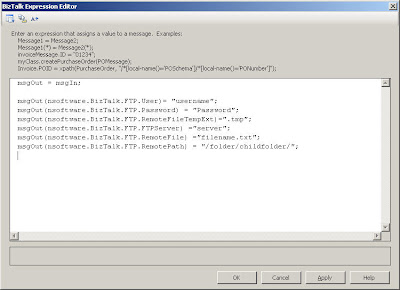
Once you have deployed your BizTalk project, you will now need to configure a physical static port in the BizTalk Admin Console. The minimal properties that need to be set in the send port are server, username and password. These settings can be completely irrelevant as they will not be used if you "override" them in your code. To verify this behaviour, I set my username to a non-existant username and provided a server name that also does not exist. When I ran my test, my FTP connection was established with the properties that I set in my orchestration in my message assignment shape. UPDATE: Please see this post (http://kentweare.blogspot.com/2007/08/n-software-ftp-adapter-update.html) as /n software has updated their software to support using these context properties as macros inside of BizTalk Admin.
A downside to all of this is if you have a message that failed during the send process, that it will use the URI of the static port and not the URI based upon the properties you used in your code. In a "true" dynamic send port you get to see the actual URI.
When comparing performance between the two adapters we noticed that the receive times where fairly comparable when receiving smaller and larger files. However, on the send side we noticed that the /n software adapter was significantly faster than the Microsoft adapter. We do have some requirements for sending some larger files (300+ mb). When sending a 380 mb file using the /n software adapter we found times in the 3 minute neighbourhood. When sending the same file, in the same scenario, we found the Microsoft Adapter was in the 25 minute neighbourhood. To ensure that we were not masking the problem, we used Send port subscriptions to ensure that we could isolate the problematic areas and stay out of the orchestrations. In order to determine these times, we used HAT and the pipeline begin/end times to record our durations.
It should be noted, that the way /n Software and Microsoft deal with temporary folders/filenames on the send side is a little different. Microsoft uses a temporary send folder where the file is written to this folder first. While the file is being written, a guid is used as its filename. Once the file has been completely written to the temp folder, it is then moved to the destination folder.
The /n software adapter, uses a temporary file extension instead of a temp folder. So as this file is being written, it will use the temporary extension that you provide it with. In our case, we were using ".tmp". When the complete file is written, the .tmp extension is dropped. So I am not sure if using this type of approach is the reason why the process is so much quicker. The delay for the Microsoft adapter is definitely not related to moving the file from the temp folder to the final folder. Using a Telnet client, or FTP Client, you are able to see the file being slowly written to the destination disk.
So all in all I think it depends on your circumstances as to which adapter you choose. The situations that I have just explained made the business case for us to use the /n Software adapter. The pricing for the /n Software Adapters is fairly reasonable. You cannot buy an adapter individually, as they come as a bundle including some additional adapters such as AS2, SFTP, Credit Card, RSS, SSH, Email, SMPP, SNPP, XMPP and S3.
Disclaimer:
I am not affiliated in any way with /n Software or any of its subsidiaries. I stand to gain nothing financially by posting this blog. I just thought that there may be some people who are in a similar situation who may enjoy some insight into this third party adapter.
I also do not have a hate on for Microsoft and its products. However, I am a firm believer in using the best tool for the job, in our situation the /n software adapter was the best option.
The project uses BizTalk 2006, so a person may be asking why would you go out and purchase a third party adapter when BizTalk 2006 includes a Microsoft FTP Adapter in the product? I am not going to go out of my way to deliberately bring the Microsoft Adapter down, but we did have a few problems that were exposed in our performance tests that would prevent us from going live and having a lot of confidence in that adapter. One of the problems involved using a Temporary receive folder under heavy load and the inability to use this temporary receive folder in ASCII mode.
I had heard about the /n software FTP adapter earlier when someone asked me whether we could use Secure FTP or FTPS to when communicating with some external partners for a different project.
We were able to download a trial version of the adapter and were happy to find out that we could not duplicate the same problem that occurred when using the Microsoft Adapter and we could use ASCII mode when using a temporary receive folder while retrieving files from Unix.
For those that are not aware, Unix systems and Windows systems have different ways of indicating a Carriage Return/Line Feed. In Unix, this is represented by just a carriage return, also represented in Hex as 0D (zeroD) and in Windows as two characters (0D 0A) (zeroD zeroA). When using an FTP client, such as an adapter, the client will take care of the "translation" of these characters depending upon the target environment. When using Binary, the carriage returns are preserved "as is". So if you developed a schema with Child delimiter characters based upon the windows format and receive a document from Unix using Binary mode, you will end up with a parsing error. BizTalk will try to break up lines based upon the windows format, yet the message that was sent to BizTalk is in the Unix format. To get around this you need to manage multiple versions of Schemas if you need to receive a file from a Unix Box and send to a Windows box. This is a bit of hassle. Suffice to say, we were very happy that the /n software adapter supported temporary receive folders in ASCII mode.
As part of our project, we need to determine where to send certain files at runtime. Some destinations will be Unix and some will be windows. So sometimes we will be sending files out using FTP and sometimes using the File Adapter. Since we are determining this all at runtime, we try to use dynamic send ports and set the Microsoft.XLANGs.BaseTypes.Address property of the Dynamic sent port like below:
SendDynamicFlatFile(Microsoft.XLANGs.BaseTypes.Address)= completeDestinationURI;
We were a little surprised that when we tried to use this type of method with the /n software adapter that it would not work. What we were seeing was an error in the event viewer that essentially said something like "Unable to send file to server x, using this username ' ' ". What seemed to be happening is that the username context property for the adapter was not being set. We were able to check the context properties and the username and password was being set.
After exchanging a few emails with /n software support, we found that the adapter does not support using the Microsoft.XLANGs.BaseTypes.Address property via runtime code. So technically, the adapter does not support dynamic send ports. So I am going to get into some further details about how you can use the /n software adapter in a dynamic fashion by using a static send port.
Like most adapters, the /n software adapter exposes adapter context properties. You can explicitly set these properties at runtime in a message construction shape. When these properties are set via code, they are respected by the send port. In order to have these settings visible in a Message assignment window, you need to include a reference to nsoftware.BizTalk.FTPAdapter.

Once you have deployed your BizTalk project, you will now need to configure a physical static port in the BizTalk Admin Console. The minimal properties that need to be set in the send port are server, username and password. These settings can be completely irrelevant as they will not be used if you "override" them in your code. To verify this behaviour, I set my username to a non-existant username and provided a server name that also does not exist. When I ran my test, my FTP connection was established with the properties that I set in my orchestration in my message assignment shape. UPDATE: Please see this post (http://kentweare.blogspot.com/2007/08/n-software-ftp-adapter-update.html) as /n software has updated their software to support using these context properties as macros inside of BizTalk Admin.
A downside to all of this is if you have a message that failed during the send process, that it will use the URI of the static port and not the URI based upon the properties you used in your code. In a "true" dynamic send port you get to see the actual URI.
When comparing performance between the two adapters we noticed that the receive times where fairly comparable when receiving smaller and larger files. However, on the send side we noticed that the /n software adapter was significantly faster than the Microsoft adapter. We do have some requirements for sending some larger files (300+ mb). When sending a 380 mb file using the /n software adapter we found times in the 3 minute neighbourhood. When sending the same file, in the same scenario, we found the Microsoft Adapter was in the 25 minute neighbourhood. To ensure that we were not masking the problem, we used Send port subscriptions to ensure that we could isolate the problematic areas and stay out of the orchestrations. In order to determine these times, we used HAT and the pipeline begin/end times to record our durations.
It should be noted, that the way /n Software and Microsoft deal with temporary folders/filenames on the send side is a little different. Microsoft uses a temporary send folder where the file is written to this folder first. While the file is being written, a guid is used as its filename. Once the file has been completely written to the temp folder, it is then moved to the destination folder.
The /n software adapter, uses a temporary file extension instead of a temp folder. So as this file is being written, it will use the temporary extension that you provide it with. In our case, we were using ".tmp". When the complete file is written, the .tmp extension is dropped. So I am not sure if using this type of approach is the reason why the process is so much quicker. The delay for the Microsoft adapter is definitely not related to moving the file from the temp folder to the final folder. Using a Telnet client, or FTP Client, you are able to see the file being slowly written to the destination disk.
So all in all I think it depends on your circumstances as to which adapter you choose. The situations that I have just explained made the business case for us to use the /n Software adapter. The pricing for the /n Software Adapters is fairly reasonable. You cannot buy an adapter individually, as they come as a bundle including some additional adapters such as AS2, SFTP, Credit Card, RSS, SSH, Email, SMPP, SNPP, XMPP and S3.
Disclaimer:
I am not affiliated in any way with /n Software or any of its subsidiaries. I stand to gain nothing financially by posting this blog. I just thought that there may be some people who are in a similar situation who may enjoy some insight into this third party adapter.
I also do not have a hate on for Microsoft and its products. However, I am a firm believer in using the best tool for the job, in our situation the /n software adapter was the best option.
Sunday, May 20, 2007
BAM - Tracking data using TPE and BAM API
As mentioned in a previous post, I am currently working on a system that moves system generated files to internal and external parties. We had a requirement to provide some visibility to our users for these file movements. We tried to use as many core BizTalk features as possible without creating a lot of custom components. With this said BAM fit in quite well with our requirements. In addition to providing some visibility to our users, we also use BAM to support our auditing requirements.
We also have some requirements that allow our users to re-send a previously sent message. Occasionally some external partners would like a file re-sent. So something that we are also tracking in BAM is the Message ID of the received file. This Message ID does map to the original message in the BizTalkDTADb(live archive or long term archive). For more information about the archives, please see this previous post: http://kentweare.blogspot.com/2007/05/biztalk-retrieving-tracked-messages.html
So one challenge that I did encounter while developing a suitable solution is that there is some data that we want to track via TPE to take advantage of some of the built in features like Business Milestones, Business Milestone Groups, Durations, Measures and Progress Dimensions. The Progress Dimension is a really valuable feature in our design. We have to transfer some large files so our users wanted to see that files were "in progress" while in-flight, completed when finished, and exception when there was a problem sending the file. A Progress Dimension allows you to define these states and then Biztalk will auto-magically track these states.
The problem with using only TPE is that we had some data that did not move through the ports, and therefore cannot be tracked via TPE. In TPE, you typically drag elements/attributes from a schema and map them against a BAM Activity Item. If you try to drag a data element from a schema that did not hit a receive or send port you will get an error indicating that "There are no ports associated with element name
After digging around the net, I found a very useful article by Richard Seroter http://blogs.msdn.com/richardbpi/archive/2006/03/29/564114.aspx discussing tracking BAM events inside of an orchestration. In his blog he discusses tracking the entire process outside of TPE. In his scenario he is Beginning the Activity inside of a Expression shape. I found that this could work for my requirements, but I also wanted to take advantage of some of the TPE features. If only I could somehow link TPE with Orchestration level tracking.
I did find a way to do this by using "Continuation". Continuation allows you to link multiple segments together. In this context this includes a TPE segment and a Orchestration/BAM API segment.
In my situation, TPE starts the process, inside the orchestration I update the activity with data that did not pass through my receive port and will not pass through my send port and finally TPE will complete the activity.
A question that may come to mind is where am I getting this data from if it does not come through the initial receive port and does not exit the destination send port? I work in the utility industry here in Canada. A specification has been created that defines a naming convention based upon many, many different transaction types. The naming convention includes the following: transaction-type_from-retailer
Using the BAM API is a great solution for updating the activity as the message is moving through BizTalk.
So enough banter, here is a snapshot of a portion of my TPE file:

So any element on the left hand side that has a "+" beside it represents BAM data that will be tracked via TPE. Some important items to note here are the StartDateTime, EndDateTime and Exception. These are milestones, that when implemented with a Progress Dimension provide you a near real time status of your business process. In order to configure these milestones, you drag across the appropriate Orchestration shape to match up with the right milestone. So for the StartDateTime, I dragged across the initial Receive shape. You can drag multiple shapes accross to one milestone to represent the various paths that your orchestration can take.
As mentioned above, we want to have the ability to track certain segments using TPE and certain segments using the BAM API. In order to accomplish this we need to create a Continuation Folder. In order accomplish this, right click on the root folder and select "New Continuation". You then need an identifier that you will use to link these segments together. From my initial message I have an element called "ContinuationID" that I have placed in this Continuation Folder. Note this element is not to be confused with TPE's ContinuationID element.
You can now go ahead and apply this tracking profile. When you do you will receive the following warning:

This is ok, because in the Orchestration we will be providing this ContinuationID.
Now lets take a look at what is involved in the Orchestration.
There are a few options when using Orchestration level API calls: DirectEventStream, BufferedEventStream and OrchestrationEventStream. Darren Jefford has provided a summary of these different options which can be viewed at: http://blogs.msdn.com/darrenj/archive/2006/03/17/554049.aspx
I chose to go with the OrchestrationEventStream due to the fact that you do not need to configure a connection string for it and that it utilizes the orchestration persistence mechanism.
So in your BizTalk project, include references to the following assemblies: Microsoft.BizTalk.Bam.EventObservation and Microsoft.BizTalk.Bam.XLANGs. These assemblies may be found in your Microsoft BizTalk Server 2006\Tracking folder.
Since we have already started tracking our business process, via TPE, when we are inside our orchestration, we want to update this activity. In order ensure that our events "line up" between our orchestration and TPE, we need to provide a Continuation Token to ensure that our events from the Orchestration and TPE show up in the same line(record) within our BAM database View/BAM Portal.
This "Continuation Token" is made up of the name of my Continuation Folder(_Continuation) and a unique identifier. This unique identifier is made up of a GUID that is available as part of my inbound message. TPE will track this value and since this value is part of my inbound document I am able to link these two values together.  As part of every call that I make I include this continuation token:
 As part of every call that I make I include this continuation token:
continuationToken = "_Continuation" + msg_Internal.ContinuationID;
For each event that I want to track, I call the following "Update Activity" method
Microsoft.BizTalk.Bam.EventObservation.OrchestrationEventStream.UpdateActivity("FileMovements", continuationToken,"FileName",fileName);
Microsoft.BizTalk.Bam.EventObservation.OrchestrationEventStream.UpdateActivity("FileMovements", continuationToken,"ArchiveActivityId",msg_Internal(MessageTracking.ActivityIdentity));
The parameter list for this call is Activity Name, Activity Instance, Activity Item Name, Activity Item Value.
Once you have updated your activity with all of your related data, you can end this portion of the segment by calling the EndActivity method
Microsoft.BizTalk.Bam.EventObservation.OrchestrationEventStream.EndActivity("FileMovements",continuationToken);
So this does not End the entire activity, I rely upon TPE events to complete the entire activity. For instance if a message fails its initial send attempt, it will retry based upon the Send port configuration. While these re-send attempts are occurring, the status of my business process remains in progress until the file is sent correctly.
So as you can see, you do have a few options when tracking BAM data. Obviously there are pros, cons and limitations to both TPE and BAM API calls but you should be able to satisfy your requirements one way or another.


Sunday, May 13, 2007
BizTalk - Retrieving Tracked messages through the WMI provider
I am currently involved in a project where we need to provide our users the ability to re-send a file(message). I use the term file as this BizTalk application consumes files from various source systems and sends them to internal/external destination systems primarily as files.
Retrieving tracked messages from HAT is not a complex task, however we want to provide our users with some visibility into what files BizTalk has moved and give them the ability to re-send them if so desired.
There is a class called MSBTS_TrackedMessageInstance2 that allows tracked messages to be saved to disk. This class can be called through a .Net Web App, WinForm app, BizTalk app ..etc.
To keep things simple for this blog, I have included some POC code that is called from a Windows Form app. Be sure to include using System.Management; and include a reference to Microsoft.BizTalk.Operations.
When the message is written to disk, both the context xml file and the message are written as two separate files. This action generates the same output that HAT does when you issue the "Save All Tracked Messages" command.
Some of the important things to note in this code is the name of your BizTalk Management Database - BizTalkMgmtDb. This is significant because the name of your Tracking database is found in the BizTalkMgmtDb - adm_Group table.

This is important as your run time BizTalkDTADb cannot grow to infinite size and still be performant. Having this TrackingDBName field does allow you some flexibility as you are then able to specify another BizTalkDTADb which represents a long term archive. You would not modify your primary Management Database to do this. That would break your BizTalk runtime. What you can do is create a copy of your Management Database and then modify this value to represent your long term archive. So you essentially have two management databases and two tracking databases. By creating a copy of the Management database, you can then update this TrackingDBName field to reflect your long term archive tracking database. This allows you to keep your run time BizTalk environment lean and mean while still having long term archived messages.
The long term archive may be the result of an aggregation of your Archive and Purge extracts. There is a tool called the Stitch Utility that will append your Archive and Purge extracts which creates this long term storage archive. For more information regarding this utility check out: http://www.gotdotnet.com/codegallery/releases/viewuploads.aspx?id=67bbd6ea-850e-4d93-be87-df6788976cab
The MessageInstance ID is also a critical parameter in the WMI call as it is able to uniquely identify the message and is based upon a GUID. The MessageInstance ID can be retrieved via a couple methods. One way is through HAT. When you view the Message flow for a particular message, the MessageInstance Id is one of the context properties that is tracked.

Another way of getting this value is through the context properties of the incoming message. Suppose you have an inbound message called msg_In. You could retrieve the id for this message by getting the value of msg_In(BTS.MessageID).
As part of our project, we track this MessageInstanceId in BAM. We have a custom ASP.Net web page that queries the associated BAM view in order to retrieve the MessageInstance ID. One nice thing about tracking the information in BAM is that we can also track other meta data about the file movement such as the File name, Date/Time, Source/Destination locations and several other fields. This allows our users to query upon several different parameter combinations in order to find the particular file(message) that they are interested in.
I plan on blogging more about the BAM portion of this solution in an upcoming post.
Retrieving tracked messages from HAT is not a complex task, however we want to provide our users with some visibility into what files BizTalk has moved and give them the ability to re-send them if so desired.
There is a class called MSBTS_TrackedMessageInstance2 that allows tracked messages to be saved to disk. This class can be called through a .Net Web App, WinForm app, BizTalk app ..etc.
To keep things simple for this blog, I have included some POC code that is called from a Windows Form app. Be sure to include using System.Management; and include a reference to Microsoft.BizTalk.Operations.
string strDB = "BizTalkMgmtDb";
string strDBServer = "your_server_name_here";
string guidMessageInstanceId = txtGuid.Text;
string strOutputFolder = @"C:\";

try
{
  string strInstanceFullPath =
  "ROOT\\MicrosoftBizTalkServer:MSBTS_TrackedMessageInstance2.MgmtDBServerOverride=\""
+ strDBServer + "\",MgmtDbNameOverride=\"" + strDB +
"\",MessageInstanceID=\"{" + txtGuid.Text + "}\"";


  // Load the MSBTS_TrackedMessageInstance
  ManagementObject objTrackedSvcInst = new ManagementObject(strInstanceFullPath);

  // Invoke "SaveToFile" method to save the message out into the specified folder
  objTrackedSvcInst.InvokeMethod("SaveToFile", new object[] { strOutputFolder });

}

catch (Exception ex)
{
  System.Diagnostics.EventLog.WriteEntry("Get Tracked Message", ex.ToString());

}
When the message is written to disk, both the context xml file and the message are written as two separate files. This action generates the same output that HAT does when you issue the "Save All Tracked Messages" command.
Some of the important things to note in this code is the name of your BizTalk Management Database - BizTalkMgmtDb. This is significant because the name of your Tracking database is found in the BizTalkMgmtDb - adm_Group table.

This is important as your run time BizTalkDTADb cannot grow to infinite size and still be performant. Having this TrackingDBName field does allow you some flexibility as you are then able to specify another BizTalkDTADb which represents a long term archive. You would not modify your primary Management Database to do this. That would break your BizTalk runtime. What you can do is create a copy of your Management Database and then modify this value to represent your long term archive. So you essentially have two management databases and two tracking databases. By creating a copy of the Management database, you can then update this TrackingDBName field to reflect your long term archive tracking database. This allows you to keep your run time BizTalk environment lean and mean while still having long term archived messages.
The long term archive may be the result of an aggregation of your Archive and Purge extracts. There is a tool called the Stitch Utility that will append your Archive and Purge extracts which creates this long term storage archive. For more information regarding this utility check out: http://www.gotdotnet.com/codegallery/releases/viewuploads.aspx?id=67bbd6ea-850e-4d93-be87-df6788976cab
The MessageInstance ID is also a critical parameter in the WMI call as it is able to uniquely identify the message and is based upon a GUID. The MessageInstance ID can be retrieved via a couple methods. One way is through HAT. When you view the Message flow for a particular message, the MessageInstance Id is one of the context properties that is tracked.

Another way of getting this value is through the context properties of the incoming message. Suppose you have an inbound message called msg_In. You could retrieve the id for this message by getting the value of msg_In(BTS.MessageID).
As part of our project, we track this MessageInstanceId in BAM. We have a custom ASP.Net web page that queries the associated BAM view in order to retrieve the MessageInstance ID. One nice thing about tracking the information in BAM is that we can also track other meta data about the file movement such as the File name, Date/Time, Source/Destination locations and several other fields. This allows our users to query upon several different parameter combinations in order to find the particular file(message) that they are interested in.
I plan on blogging more about the BAM portion of this solution in an upcoming post.
Subscribe to:
Comments (Atom)